
If you frequently start new projects, you’ve probably found yourself copying an existing project over and over again.Maybe you have a Laravel starter kit, a Node.js boilerplate, a PHP project structure, or simply a repository containing your preferred folders, configurations, and development tools.
Instead of cloning a project and cleaning it up every time, GitHub provides a much cleaner solution: Template Repositories.
# Why Use a Template Repository?
A template repository lets you reuse a project structure without carrying over its Git history.This is perfect for:
- Starter kits
- Boilerplate projects
- Company project structures
- Internal frameworks
- Course templates
- Demo applications
Instead of manually copying files or deleting old commits, GitHub generates a completely new repository from your template with just a few clicks.
# Method 1: Create Your Own GitHub Template Repository
Suppose you’ve built a project that you want to use as the starting point for future work.You can turn that repository into a reusable template
- Select your repositiory
- open the settings tab
- Find the Template repository option and check the box.
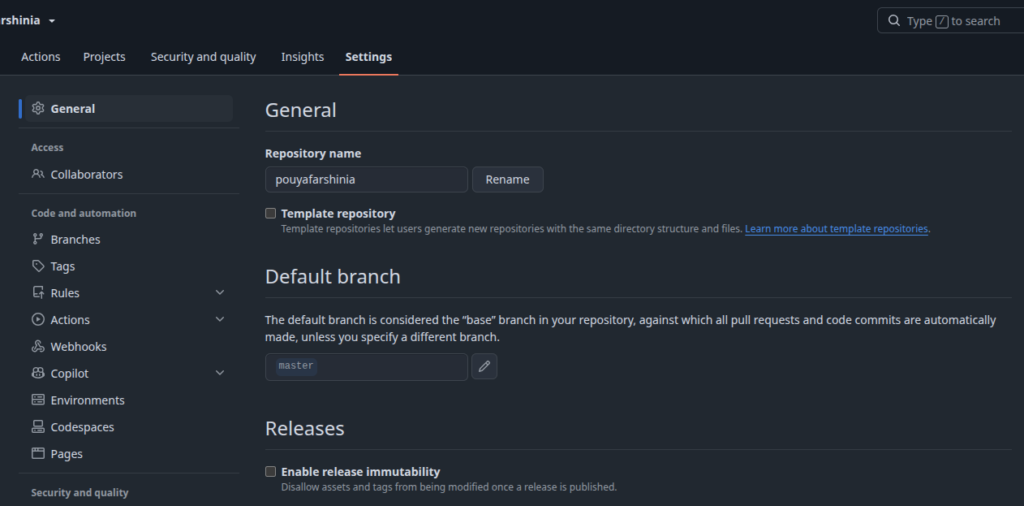
The next time you create a repository on GitHub, you’ll notice an additional option to choose a Repository template.
# Method 2: Use Someone Else’s Repository as a Template
You don’t have to own a template repository to benefit from this feature.If another repository has been published as a template, GitHub lets you generate your own copy.
- Open the repository page.
- Click Use this template (or Create a new repository from the template, depending on the GitHub interface).
- Choose your repository name and visibility.
- Create the repository.
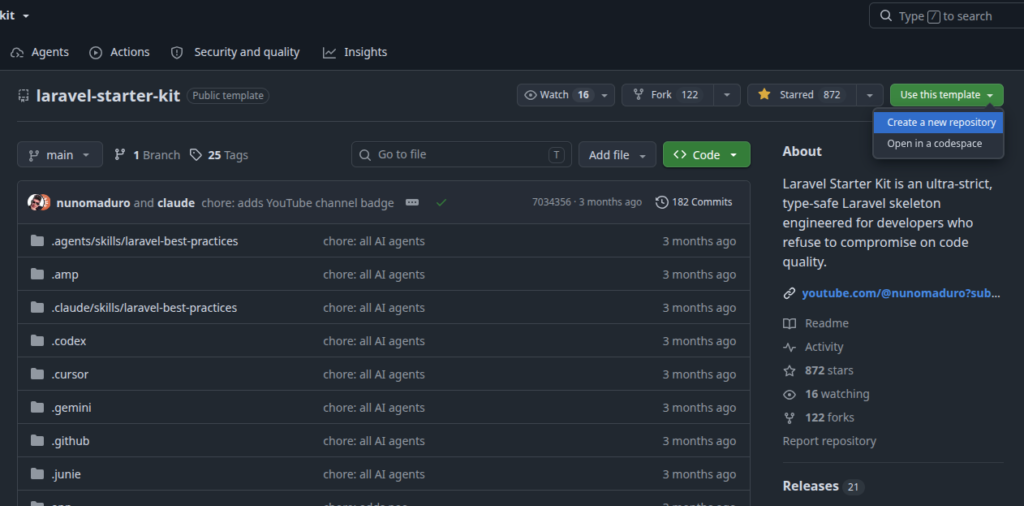
GitHub will generate a fresh repository under your account using the original project as the starting point.
Template repositories are particularly useful when you regularly create projects with the same initial setup.